
BMW 5 Series: Overview
The vehicle interior shows significant further developments in comparison to the F10. The all-round visibility has been improved. This is further supported by the very flat design of the roof function center. In addition, the headliner, which is equipped with sound insulation, helps to make the interior cabin noticeably quieter than the F10.
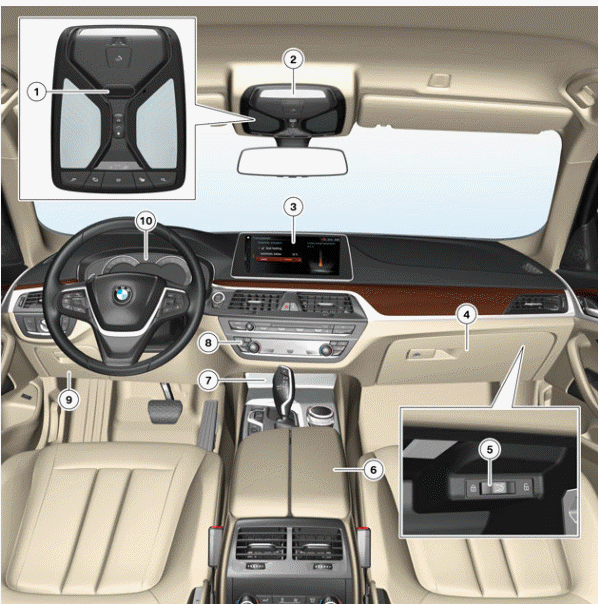
G30 Front overview
- Gesture recognition camera
- Roof switch panel
- Central Information Display (CID)
- Glove box
- Hotel position switch
- Center console
- Cup holder and wireless charging station
- Heating and air conditioning controls/audio operating unit with touch operation
- Glove box, driver's side
- Instrument cluster
READ NEXT:
 Seats
Seats
Front seats
As a design element, the seats are an important element of a sporty-luxurious
vehicle interior. Special
stitching accents are provided in the form of decorative stitches for the Dakota
l
Seat heating for driver/front passenger
For the first time on a BMW vehicle it is now possible to pre-set the seat
heating. It is possible to select
between the driver and front passenger and to choose the heating stage. If the
ambient te
Luggage Compartment
Luggage compartment volume
The luggage compartment capacity of the new BMW 5 Series has been increased
by 10 liters in
comparison to its predecessor, the F10, to 530 liters / 14 ft³. By adding a
co
SEE MORE:
Intersection Warning
Intersections are some of the most likely points for accidents in urban
traffic. Statistics tell us that
approximately one accident in three, with injury to persons, occurs at an
intersection. Accidents here
can largely be attributed to distraction or poor estimation by the drivers.
The Intersect
General information, Safety information
General information
The engine oil consumption is dependent on
your driving style and driving conditions.
Therefore, regularly check the engine oil level after
refueling by taking a detailed measurement.
The engine oil consumption can increase in the
following situations, for instance:
Sporty dr
© 2019-2026 Copyright www.bmw5g30.com
