
BMW 5 Series: Overview
In February 2017, the 7th generation of the BMW 5 Series G30 will be launched. The G30 contains a wealth of new technologies and design elements that have been further developed and refined. The closed radiator grill and the precise contours of the hood lend the front of the new BMW 5 Series a sporty character. The elegant lines of the side view are emphasized by the distinctive bead and the accentuated Hofmeister kink.
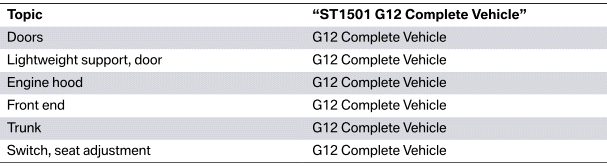
In terms of technology, the new BMW 5 Series is based on the G12. The topics listed below are described in the G12 Technical Reference Material "ST1501 G12 Complete Vehicle".

BMW G30
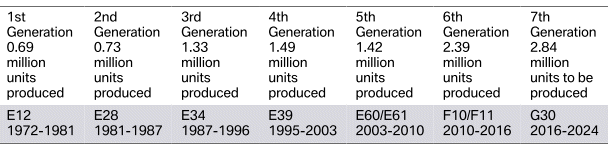
History

BMW 5 Series models - history
Dimensions and silhouette comparison
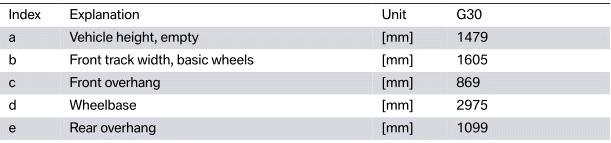
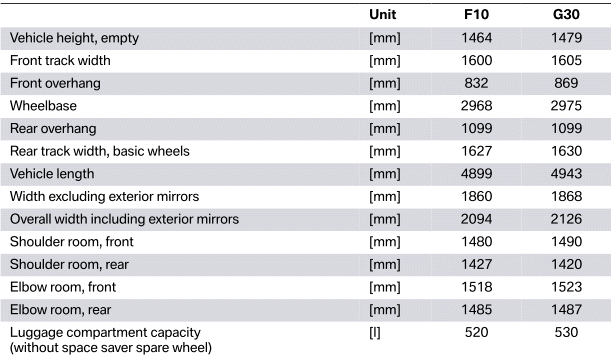
Dimensions G30
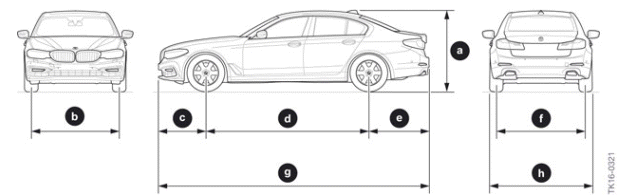
BMW G30 External dimensions

Comparison F10/G30
Silhouette comparison
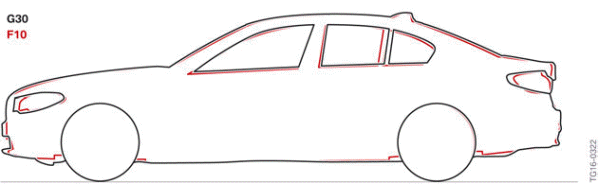
Silhouette comparison of G30/F10
Models
The G30 models will be available in 2017 with the following models.
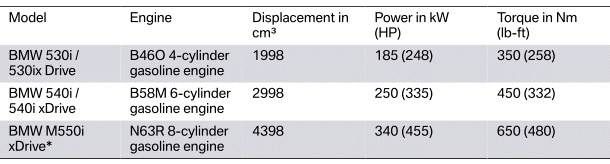
* The BMW M550i xDrive will follow a few months after the launch of the 530i / 530ix Drive and 540i / 540i xDrive.
READ NEXT:
 Exterior equipment
Exterior
G30 Exterior highlights
Air flaps in the radiator grill
Air Breather
Headlights extend to the radiator grill
Adjustable housing for rear lights
Underbody
The almost fully closed vehicl
Body overview, Body structure
Body overview
G30 Side frame structure
Multiphase steel (> 300 N/mm²)
Ultra-high-strength steel (> 900 N/mm²)
Aluminum
Deep-drawing steel (< 300 N/mm²)
Other ste
SEE MORE:
Displaying Points of Interest on
the map
Concept
The Points of Interest categories can be displayed
on the map as symbols.
Selecting categories
1. Press the button on the
Controller.
2. Move the Controller to the right.
3. "Settings".
4. "Map settings".
5. "Points of interest on the map".
6. Select the desired setting.
The display
Vehicle apps
Concept
BMW ConnectedDrive Services offer the option
to display information regarding the weather or
sports, for example, on the Control Display using
apps and other functions.
Display BMW ConnectedDrive
Service apps
1. "Apps".
2. "Installed apps".
3. "All services".
4. Select desired app.
5. "F
