
BMW 5 Series: Drive Variants
BMW 5 Series G30 2016-2026 Training Manual / Powertrain / Drive Variants
Like in the predecessor, the G30 is offered with optional xDrive all-wheel drive. All models receive the 8-speed Sport automatic transmission as standard.
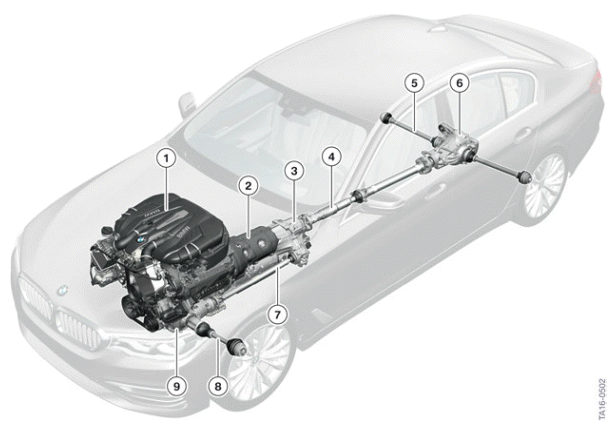
Drive overview G30
- Engine
- Automatic transmission
- Transfer box VTG (only for xDrive)
- Prop shaft
- Output shaft, rear
- Rear axle differential
- Front drive shaft (only for xDrive)
- Front output shaft (only for xDrive)
- Front axle differential (only for xDrive)
Models
With the exception of the 8-cylinder gasoline engine (N63TU2), which has had an engineering upgrade, the newly-developed modular engines are used. All engines meet the ULEV II or SULEV regulations for the US.
- ULEV II = Ultra-Low Emission Vehicle
- SULEV = Super Ultra-Low Emission Vehicle
G30 models

READ NEXT:
 Gasoline Engines
The engines of the G30 are already known from the BMW 7 Series G12. The
following table shows
the common features and differences in terms of power and torque specifications
in the various
performan
Technical data
Technical data BMW 530i engine
B46B20O0 engine in the G30
Engine highlights B46B20O0
List of the most important special features:
1. Direct rail injection system with 200 bar pressure.
2. 4th gene
BMW 540i engine technical data
B58B30M0 engine in the G30
Engine highlights B58B30M0
List of the most important special features:
1. Direct rail injection system with 200 bar pressure.
2. Valvetronic 4th generation.
3. Heat man
SEE MORE:
Overview of chassis and suspension
Overview of chassis and suspension in the G30
Front axle spring strut
Auxiliary battery in the engine compartment (optional equipment)
Brake servo
Steering column
Steering wheel
Rear axle spring strut
Five-link rear suspension
Rear axle slip angle control (HSR) (optional equipment)
Electr
Steering
The G30 has Electronic Power Steering (EPS) in the following different
versions:
Standard steering 12 V
Integral Active Steering 12 V
Integral Active Steering 24 V
Overview of equipment specifications
The following graphic shows the installation positions of the different
system components.
© 2019-2026 Copyright www.bmw5g30.com
