
BMW 5 Series: Introduction
History
.png)
Historical overview of the BMW 5 Series
- E12 (1972-1981)
- E28 (1981-1987)
- E34 (1987-1995)
- E39 (1995-2003)
- E60/E61 (2003-2010)
- F10/F11 (2010-2016)
- G30 (SOP late 2016 as 2017 MY)
Overview of system descriptions
Many of the systems used are already known from the current BMW 7 Series G12. The "Comparison of G12 with G30" chapter lists the common elements and the differences. The explanations of the systems already familiar from the G12 are kept brief. The system descriptions can be reviewed from the various technical reference manual's listed below.
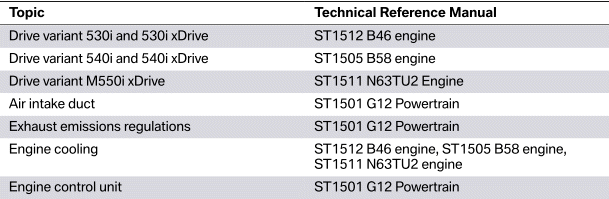

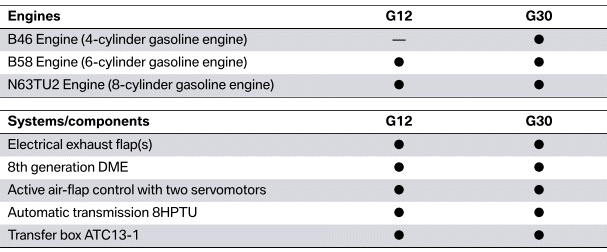
Drive comparison G12 with G30
Many G30 systems have already been introduced in the G12. The following table provides an overview of the differences and common features between the two series.
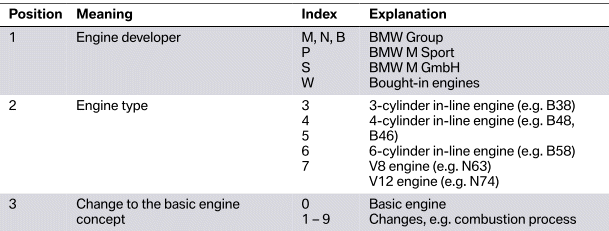
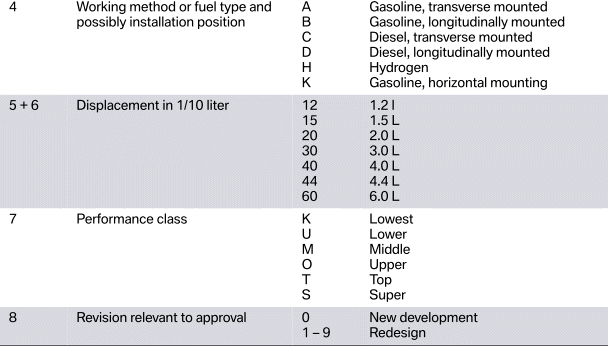
Engine designation
The engine designation is used to uniquely identify the various engines. The following table provides an overview of the composition of the different engine codes.
READ NEXT:
 Drive Variants
Like in the predecessor, the G30 is offered with optional xDrive all-wheel
drive. All models receive the
8-speed Sport automatic transmission as standard.
Drive overview G30
Engine
Automatic tran
Gasoline Engines
The engines of the G30 are already known from the BMW 7 Series G12. The
following table shows
the common features and differences in terms of power and torque specifications
in the various
performan
Technical data
Technical data BMW 530i engine
B46B20O0 engine in the G30
Engine highlights B46B20O0
List of the most important special features:
1. Direct rail injection system with 200 bar pressure.
2. 4th gene
SEE MORE:
Side Collision Avoidance
The Side Collision Avoidance is part of the Active Lane Keeping Assistant
with Side Collision
Avoidance. The Active Lane Keeping Assistant with Side Collision Avoidance is
part of the scope
of supply of the Active Driving Assistant Plus, optional equipment (OE 5AT). The
Side Collision
Avoidance i
Lashing eyes in the cargo
area
General information
Attach load securing aids, such as lashing straps,
tensioning straps, draw straps or cargo nets, to
the lashing eyes in the cargo area.
Lashing eyes
There are four lashing eyes in the cargo area for
securing cargo.
Storage compartments in
the cargo area
Multi-function hook
Gener
