
BMW 5 Series: Sockets
General information
The total load of all sockets must not exceed 140 watts at 12 volts.
Do not damage the socket by using non-compatible connectors.
Safety information
Warning
Devices and cables in the unfolding area of the airbags, such as portable navigation devices, can hinder the unfolding of the airbag or be thrown around in the car's interior during unfolding.
There is a risk of injury. Make sure that devices and cables are not in the airbag's area of unfolding.
NOTICE
Battery chargers for the vehicle battery can work with high voltages and currents, which means that the 12 volt on-board network can be overloaded or damaged. There is a risk of damage to property. Only connect battery chargers for the vehicle battery to the starting aid terminals in the engine compartment.
NOTICE
If metal objects fall into the socket, they can cause a short circuit. There is a risk of damage to property.
Front center console
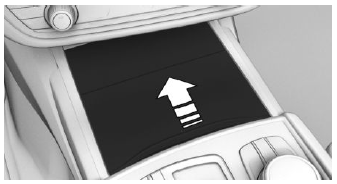
Push the cover forward until it engages.
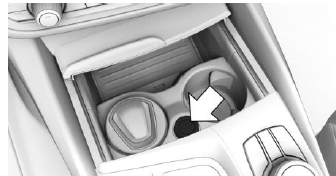
A socket is located between the cup holders.
Pull off the cover.
Rear center console
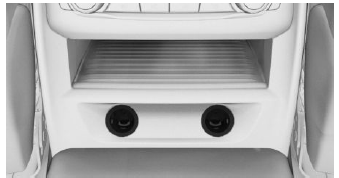
The center console contains one or two sockets.
Pull off the respective cover.
In the cargo area
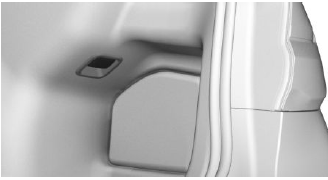
A socket is located on the right side in the cargo area. Unfold the cover.
READ NEXT:
 USB interface
General information
Follow the information regarding the connection of mobile devices to the USB
interface in the section on USB connections.
In the center armrest
A USB interface is located in the
Safety information
Warning
Loose objects or devices with a cable connection
to the vehicle, for instance mobile phones,
can be thrown into the car's interior while driving,
for instance in the event of an accident or
du
SEE MORE:
Exterior/Interior Mirrors
Exterior mirror
System wiring diagram
Exterior mirror
Outside temperature sensor
Fuses in the power distribution box, front right
Body Domain Controller (BDC)
Exterior mirror, front passenger's side
Switch block, driver's door
Exterior mirror, driver's side
Instrument panel (KOMBI)
Inside
PostCrash - iBrake
Concept
In the event of an accident, the system can bring
the vehicle to a halt automatically without intervention by the driver in
certain situations. This
can reduce the risk of a further collision and the
consequences thereof.
At standstill
After coming to a halt, the brake is released automatic
