
BMW 5 Series: Lashing eyes in the cargo area
General information
Attach load securing aids, such as lashing straps, tensioning straps, draw straps or cargo nets, to the lashing eyes in the cargo area.
Lashing eyes
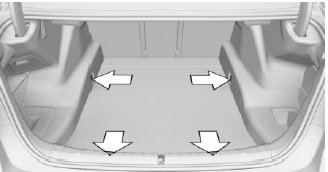
There are four lashing eyes in the cargo area for securing cargo.
Storage compartments in the cargo area
Multi-function hook
General information
A multi-function hook is located on the left side in the cargo area.
Safety information
Warning
Improper use of the multi-function hooks can lead to a risk of objects flying about during braking and evasive maneuvers, for example.
There is a risk of injury and risk of damage to property. Only hang lightweight objects, such as shopping bags, from the multi-function hooks. Only transport heavy luggage in the cargo area if it has been appropriately secured.
Folding down
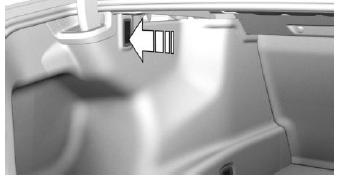
Press on the multi-function hook and turn until it engages.
Net
Small objects can be stowed in the net on the left side.
Storage compartment on the right side
A storage compartment is available on the right side of the cargo area.
Storage compartment on the left side
General information
A storage compartment is located on the left side in the cargo area.
Opening
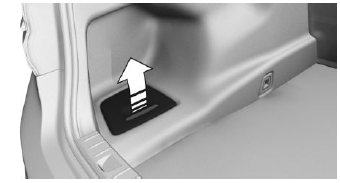
Pull the handle.
With an emergency wheel: storage compartment under the cargo area floor
There is a storage compartment under the cargo floor panel.
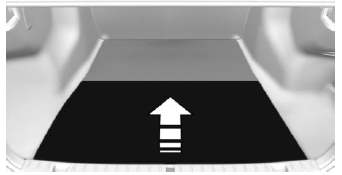
Fold up the cargo floor panel.
READ NEXT:
 Through-loading system
Concept
The cargo area can be enlarged by folding down
the rear seat backrest.
General information
The rear seat backrest is divided at a ratio of 40-
20-40. The side rear seat backrests and the
cente
With an emergency wheel:
enlarging the cargo area
Concept
The emergency wheel and any related components
can be temporarily removed to enlarge the
cargo area.
Removing the emergency wheel
and the storage compartments
1. Remove the cargo floor panel.
SEE MORE:
Deactivation criteria
The Lane Departure Warning is available at a speed range from 43 - 130 mph
(70 km/h - 210 km/h).
A warning is not issued in the following situations:
Use of the turn indicator
In construction zones
Lane is narrower than 8½ ft (2.60 m)
The warning is cancelled in the following
Wheel hub, Tire pressure control
Wheel hub
The hub and hole circle diameter on current vehicles produced by the BMW
Group was modified in
03/2014. The hub diameter was reduced from 72.5 mm to 66.5 mm. The hole pattern
was modified
from 5 x 120 (F01/F10) to 5 x 112 (G12/G30).
Comparison of wheel hub on F10 with that on G30
F10
